

This guide explains how to create your HealthSync account and securely log in to the platform.
Creating an account only takes a few minutes and gives you secure access to your personal and family health records anytime, anywhere.
Creating a New Account #
Step 1 – Open the HealthSync Application #
Open the HealthSync application using your web browser: https://app.healthsync.lk
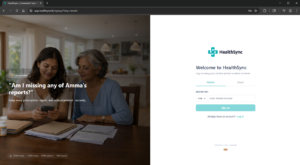
Step 2 – Start Registration #
You can register using either:
- Mobile Number
- Email Address
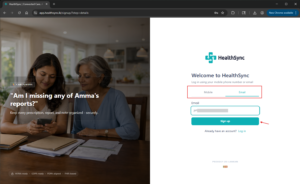
Enter your preferred contact method and click Sign Up.
Step 3 – Verify Your Account #
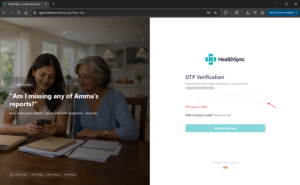
HealthSync will send a 6-digit One-Time Password (OTP) to your selected phone number or email address.
Enter the OTP to continue.
Important:
- The OTP is valid for 1 minute
- If the OTP expires, you can request a new one
Step 4 – Complete Your Profile Information #
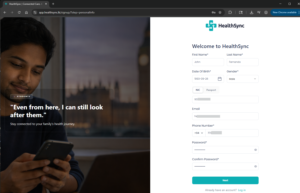
Fill in your basic profile information:
- First Name
- Last Name
- Date of Birth
- Gender
- NIC or Passport Number
- Email Address
- Phone Number
This information helps HealthSync organize and protect your medical records correctly.
Step 5 – Create a Secure Password #
Create a strong password for your account.
A strong password should include:
- At least 8 characters
- Uppercase and lowercase letters
- Numbers
- Special characters (
! @ # $ %)
Once completed, click Next.
Step 6 – Review and Sign the Consent to Service #
Before completing registration, you will be asked to review the Consent to Service agreement.
Read the document carefully and sign using the digital signature pad.
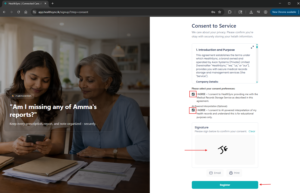
After signing, you can:
- Email a copy to yourself
- Print a copy for your records
Note: A signed copy of the agreement will automatically be saved to your HealthSync document library.
Click Register to continue.
Account Successfully Created #
Congratulations! Your HealthSync account has been created successfully.
You can now start:
- Uploading health records
- Managing family profiles
- Organizing medical documents
- Accessing your secure health timeline
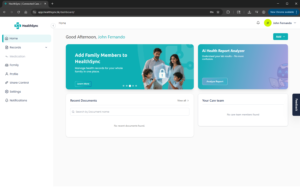
Logging In to HealthSync #
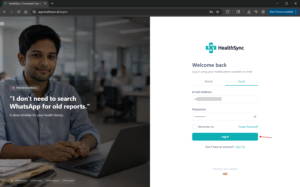
Step 1 – Open the Login Page #
Go to: https://app.healthsync.lk
Step 2 – Enter Your Login Details #
You can log in using:
- Mobile Number
- Email Address
Enter your credentials and click Log In.
Step 3 – Verify Your Login #
For added security, HealthSync uses One-Time Password (OTP) verification during login.
Enter the OTP sent to your phone number or email address.

Once verified, you will be redirected to your HealthSync Dashboard.
Welcome back!
Forgot Your Password? #
If you cannot remember your password, you can reset it securely.
Step 1 – Click “Forgot Password” #
On the login page, click Forgot Password.
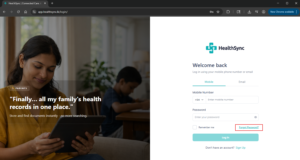
Step 2 – Reset Your Password #
- Enter your registered email address or phone number
- Follow the instructions sent to you
- Create a new secure password
Once completed, you can log in again using your new password.
Two-Factor Authentication (2FA) #
HealthSync uses Two-Factor Authentication (2FA) to help protect your account and medical information.
To log in, you will need:
- Your password
- A One-Time Password (OTP)
Both are required to access your account securely.
Why 2FA Matters #
Because HealthSync stores sensitive health information, additional security measures help protect your records from unauthorized access.
Need Help? #
If you continue experiencing issues with account creation or login, please contact the HealthSync Support Team.
We’re here to help.


