

HealthSync allows you to update document information at any time after uploading a record.
You can also permanently delete documents that are no longer needed.
This guide explains how to edit record details and safely remove documents from your account.
Updating a Record #
To update a document:
- Open the Health Records section
- Select the document you want to update from the timeline or list view
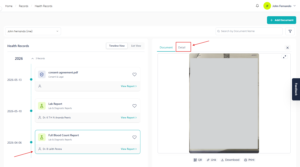
- Click the Details tab on the right side of the screen
The Details tab displays all information related to the selected document.
Editable Information #
You can update most information entered during document upload, including:
- Document name
- Family member
- Visibility settings
- Document date
- Expiry date
- Doctor name
- Hospital or clinic
- Notes and comments
- Document status
This helps keep your records accurate and properly organized over time.
Non-Editable Fields #
The Document Type field cannot currently be changed after upload.
If the document type was selected incorrectly, you may need to delete the document and upload it again using the correct type.
Saving Changes #
After updating any information:
- Click Save Changes
- The updated information will automatically be saved to your record

Changes will immediately appear in your Health Records timeline and search results.
Deleting a Record #
To permanently remove a document:
- Open the document
- Click the Details tab
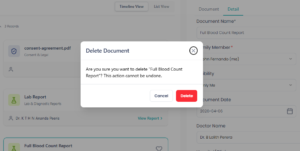
- Click the Delete button
A confirmation message will appear before the document is deleted.
Important Before Deleting #
Deleting a document is a permanent action.
Once deleted:
- The document will be removed from your HealthSync account
- AI-generated insights related to the document may also be removed
- The action cannot be undone
Please carefully review the document before confirming deletion.


