

HealthSync allows you to separate and organize health records based on different profiles.
This helps keep medical records properly grouped and easier to manage.
:::
This article explains how to switch between profiles and understand the Other profile option.
Adding and managing family members will be explained separately.
:::
Switching Between Profiles #
On the Health Records page, the selected profile appears in the dropdown at the top of the screen.
By default, your own profile is selected.
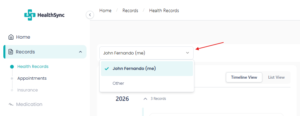
To switch profiles:
- Click the Family Member dropdown
- Select the profile you want to view
The Health Records page will automatically refresh and display records only for the selected profile.
This allows you to easily browse and manage records separately for:
- Yourself
- Family members
- Other uploaded documents
Understanding the “Other” Option #
HealthSync includes a special profile option called Other.
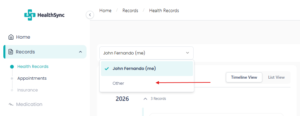
You can select Other under the Family Member field when uploading a document.
This option should be used for documents that:
- Do not belong to you
- Do not belong to your registered family members
- Should not be connected to any personal health profile
Viewing Documents Tagged as “Other” #
Any document uploaded with the Family Member set to Other will appear when you select Other from the dropdown list.
This helps you keep unrelated documents separated from your personal and family health records.
Why “Other” Is Important #
HealthSync AI can analyze uploaded health records and extract observations from documents such as lab reports.
These observations may later be used to provide:
- Personalized insights
- Health summaries
- Future AI-powered recommendations
If a document does not belong to you or your family, it should be tagged as Other to avoid incorrect health information being linked to your profile.
Documents under Other are intentionally excluded from personal AI health insights.


